

How to Check User Roles and Privileges in Oracle Database
Managing user access is one of the most important responsibilities in any Oracle Database environment. Whether you are a DBA, developer, or QA engineer, understanding who has access to what helps prevent security issues and makes debugging much easier.
In this article, we will walk through how to check:
• Roles assigned to a user
• System-level privileges
• Object-level (table) privileges
We will also use real query output and explain each column so you can clearly understand what it means.
Understanding Roles and Privileges in Oracle
Before jumping into queries, let’s quickly understand the basics.
A user in Oracle is simply an account that can log in to the database. For example, SCOTT is a commonly used sample user.
A role is a collection of privileges. Instead of assigning multiple permissions one by one, Oracle allows you to group them into roles like DBA.
A privilege defines what a user can do. These are mainly of two types:
- System privileges → Allow actions at the database level (like creating tables)
- Object privileges → Allow actions on specific objects (like selecting data from a table)
1. Checking Roles Assigned to a User
To find out which roles are assigned to a user, you can query the DBA_ROLE_PRIVS view.

What Do These Columns Mean?
- GRANTEE → The user receiving the role
- GRANTED_ROLE → The role assigned (here, DBA)
- ADM (Admin Option) → Whether the user can grant this role to others
- DEF (Default Role) → Whether this role is enabled automatically at login
- COM (Common) → Used in multitenant databases
- INH (Inherited) → Whether the role is inherited
In this case, the user SCOTT has been assigned the DBA role, which is a very powerful role. However, since the admin option is set to NO, SCOTT cannot grant this role to other users.
2. Checking System Privileges
System privileges define what actions a user can perform at the database level.
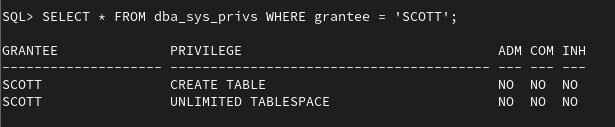
Column Explanation
- PRIVILEGE → The specific permission granted
- ADM → Whether the user can grant this privilege to others
- COM → Indicates common privilege in container databases
- INH → Whether the privilege is inherited
Here, SCOTT has:
- The ability to create tables
- No restriction on storage (unlimited tablespace)
These privileges are assigned directly and cannot be passed to other users.
3. Checking Object (Table-Level) Privileges
To see access on specific tables, use the DBA_TAB_PRIVS view.

Column Explanation
- OWNER → The schema that owns the table
- TABLE_NAME → The object name
- GRANTOR → Who granted the privilege
- PRIVILEGE → Type of access (SELECT, INSERT, DELETE, etc.)
- GRANTABLE → Whether the user can grant this privilege further
- TYPE → Object type (TABLE, VIEW, etc.)
The user SCOTT has access to the table TEST.T1 with permissions to:
- Read data (SELECT)
- Insert data
- Delete data
However, since GRANTABLE is set to NO, SCOTT cannot pass these permissions to others.
4. A Simple Way to Debug Access Issues
If a user is unable to perform an operation, these three queries usually help identify the issue:
— Check roles
SELECT * FROM dba_role_privs WHERE grantee = ‘USERNAME’;
— Check system privileges
SELECT * FROM dba_sys_privs WHERE grantee = ‘USERNAME’;
— Check object privileges
SELECT * FROM dba_tab_privs WHERE grantee = ‘USERNAME’;
This gives a complete picture of the user’s access.
Understanding roles and privileges in Oracle is not just for DBAs. It is equally important for developers and testers who work with database-driven applications.
By learning how to check:
- Roles
- System privileges
- Object-level access
you can quickly troubleshoot permission issues and ensure proper access control in your environment.
Alert: The information provided on this website is for educational purposes only. It has been tested internally, but there is no guarantee it will work in every environment. It is strongly recommended to first test the process in a non-production environment, such as a User Acceptance Testing (UAT) setup. This allows you to verify configurations, identify any issues, and ensure a smooth transition to production, minimizing the risk of disruptions in your live environment. Always conduct thorough testing before applying changes to production systems.
